

For most people, I’d start with the SSK 256GB Dual USB-C and USB-A Flash Drive, which pairs generous capacity with newer USB 3.2 Gen 2 connectivity and ports for modern phones and standard computers. The SanDisk Ultra Dual Drive USB-C & USB-A is a strong alternative for moving files between devices, while the Samsung BAR Plus suits buyers who want a sturdy single-port drive. The main tradeoffs are connection type, real-world transfer speed, capacity, and whether you need one drive or a multipack. Older USB 2.0 models can cover basic file storage, but they are a poor fit for frequent large transfers. Read on for how all 14 options differ and which one fits your setup.

Get furniture and decor delivered free — and shop member deals
- Fast, free delivery on millions of items
- Access to Prime Big Deal Days deals on October 6–7
- Prime Video, Amazon Music and more included
Complete the kit


Key Takeaways
- Dual connectors are the clearest point of difference: the SSK, Gigastone Z40, SanDisk Ultra Dual Drive, and several Lexar models can serve USB-C and USB-A devices without an adapter.
- The SSK leads on stated interface generation and capacity: its 256GB capacity and USB 3.2 Gen 2 connection make it the most capable on paper for large transfers, though device ports and workload affect actual speed.
- Multipacks trade individual-drive capacity for distribution: the Lexar A30E two-pack, RAOYI five-pack, and Gigastone 64GB five-pack are better suited to sharing or keeping separate copies than consolidating a large library.
- USB 2.0 options are best reserved for light-duty use: the RAOYI 64GB pack and SanDisk Cruzer Blade make more sense for documents or occasional transfers than repeated movement of large media files.
- Several SanDisk choices serve different priorities: Ultra Dual Drive adds USB-C flexibility, Ultra Flair focuses on a compact USB-A form, and Cruzer Blade or Glide models favor straightforward storage over newer connectivity.
| Gigastone Z40 256GB Dual USB Flash Drive |  | Best for High-Capacity Cross-Device Storage | Storage capacity: 256 GB | Connectors: USB Type-A and USB Type-C | Interface: USB 3.2 Gen 1 | VIEW ON AMAZON | See Our Full Breakdown |
| SanDisk 128GB Ultra Dual Drive USB-C & USB-A – Up to 150 MB/s Read Speed | 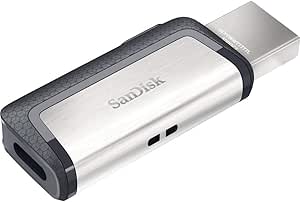 | Best for Android File Transfers | Storage capacity: 128 GB | Connectors: USB-C and USB-A | Interface: USB 3.1 Gen 1 for USB-C; USB 3.0 for USB-A | VIEW ON AMAZON | See Our Full Breakdown |
| SanDisk Ultra USB 3.0 Flash Drive, 128GB |  | Best for Simple USB-A Backups | Storage capacity: 128 GB | Interface: USB 3.0 | Backward compatibility: USB 2.0 | VIEW ON AMAZON | See Our Full Breakdown |
| Lexar A30E USB 3.2 Gen 1 Flash Drive, 128GB, 2-Pack |  | Best for Keeping a Spare on Hand | Pack size: 2 drives | Storage per drive: 128 GB | Connector: USB Type-A | VIEW ON AMAZON | See Our Full Breakdown |
| Lexar D50E 128GB Dual USB-A and USB-C Flash Drive |  | Best for Fast Dual-Connector Transfers | Storage capacity: 128 GB | Connectors: USB-A and USB-C | Interface: USB 3.2 Gen 1 | VIEW ON AMAZON | See Our Full Breakdown |
| Lexar D40E 128GB Dual USB 3.2 Gen 1 Flash Drive |  | Best for Everyday Phone-to-Computer Transfers | Capacity: 128 GB | Interface: USB 3.2 Gen 1 | Connectors: USB Type-A and USB Type-C | VIEW ON AMAZON | See Our Full Breakdown |
| RAOYI 5-Pack 64GB USB 2.0 Flash Drives |  | Best Multi-Drive Set for Simple File Sorting | Quantity: 5 drives | Capacity: 64GB per drive | Interface: USB 2.0 | VIEW ON AMAZON | See Our Full Breakdown |
| SSK 256GB Dual USB-C and USB-A Flash Drive (USB 3.2 Gen 2) |  | Best for High-Speed Dual-Device Transfers | Capacity: 256 GB | Interface: USB 3.2 Gen 2 | Connectors: USB-C and USB-A | VIEW ON AMAZON | See Our Full Breakdown |
| SanDisk Ultra Flair 128GB USB-A Flash Drive |  | Best USB-A Pick for Faster Everyday Copies | Capacity: 128GB | Connector: USB-A | Interface: USB 3.0 | VIEW ON AMAZON | See Our Full Breakdown |
| SanDisk 128GB Cruzer Blade USB 2.0 Flash Drive |  | Best Lightweight Keep-on-Hand Drive | Capacity: 128 GB | Interface: USB 2.0 | Read speed: 1 MB/s listed | VIEW ON AMAZON | See Our Full Breakdown |
| SanDisk Cruzer Glide 64GB USB 3.0 Flash Drive |  | Best Retractable USB-A Pick | Storage capacity: 64 GB | Interface: USB 3.0 | Connector: USB Type-A | VIEW ON AMAZON | See Our Full Breakdown |
| GIGASTONE 64GB Dual USB Flash Drive 5-Pack, USB 3.2 Gen 1, 2-in-1 USB-C + A |  | Best Multi-Device Pack | Capacity per drive: 64 GB | Pack quantity: 5 | Interface: USB 3.2 Gen 1; compatible with USB 2.0, 3.0, and 3.1 | VIEW ON AMAZON | See Our Full Breakdown |
| SanDisk Cruzer Glide 64GB USB-A Flash Drive |  | Best for Password-Protected Files | Storage capacity: 64 GB | Interface: USB 2.0 | Connector: USB Type-A | VIEW ON AMAZON | See Our Full Breakdown |
| Samsung BAR Plus USB 3.1 Flash Drive, 128GB, Titan Gray |  | Best Premium-Speed USB-A Drive | Storage capacity: 128 GB | Interface: USB 3.2 Gen 1 | Connector: USB Type-A | VIEW ON AMAZON | See Our Full Breakdown |
| usb flash drife | Interface | Read speed | Warranty | Write speed |
|---|---|---|---|---|
| Gigastone Z40 256GB Dual USB F | USB 3.2 Gen 1 | Up to 100 MB/s | 5-year limited warranty | 40 MB/s |
| SanDisk 128GB Ultra Dual Drive | USB 3.1 Gen 1 for USB-C; USB 3.0 for USB-A | Up to 150 MB/s | — | 10 MB/s |
| SanDisk Ultra USB 3.0 Flash Dr | USB 3.0 | Up to 100 MB/s | 1 year | — |
| Lexar A30E USB 3.2 Gen 1 Flash | USB 3.2 Gen 1 | Up to 100 MB/s | — | — |
| Lexar D50E 128GB Dual USB-A an | USB 3.2 Gen 1 | Up to 400 MB/s | 5-year limited warranty | Up to 360 MB/s |
| Lexar D40E 128GB Dual USB 3.2 | USB 3.2 Gen 1 | Up to 100 MB/s | 3-year limited warranty | 80 MB/s |
| RAOYI 5-Pack 64GB USB 2.0 Flas | USB 2.0 | Up to 12 MB/s | — | Up to 5 MB/s |
| SSK 256GB Dual USB-C and USB-A | USB 3.2 Gen 2 | Up to 550 MB/s | — | Up to 500 MB/s |
| SanDisk Ultra Flair 128GB USB- | USB 3.0 | — | — | — |
| SanDisk 128GB Cruzer Blade USB | USB 2.0 | 1 MB/s listed | 5-year limited warranty | 30 MB/s |
| SanDisk Cruzer Glide 64GB USB | USB 3.0 | — | 5-year limited manufacturer warranty | — |
| GIGASTONE 64GB Dual USB Flash | USB 3.2 Gen 1; compatible with USB 2.0, 3.0, and 3.1 | — | 5-year limited | — |
| SanDisk Cruzer Glide 64GB USB- | USB 2.0 | — | 5-year limited | — |
| Samsung BAR Plus USB 3.1 Flash | USB 3.2 Gen 1 | Up to 400 MB/s | 5-year limited warranty | Up to 200 MB/s |
More Details on Our Top Picks
Gigastone Z40 256GB Dual USB Flash Drive
The Gigastone Z40 is the capacity-first pick here: its 256GB gives you twice the space of the 128GB SanDisk Ultra Dual Drive while retaining both USB-A and USB-C connectors. That pairing suits buyers who move large photo or video libraries between newer phones and older computers without keeping an adapter handy. Its stated read speed of up to 100 MB/s is useful for retrieving files, but the 40 MB/s write speed makes it less compelling for repeated large backups than the much faster Lexar D50E. The dustproof, shockproof, magnetic-proof, water-resistant design and five-year limited warranty add reassurance for everyday carrying, though water resistance is not a substitute for waterproof protection. Choose it for capacity and connector flexibility, not the quickest write transfers.
Pros:- 256GB capacity exceeds the 128GB options in this batch.
- USB-A and USB-C connectors support transfers between compatible older and newer devices.
- Dustproof, shockproof, magnetic-proof, and water-resistant construction.
- Five-year limited warranty.
Cons:- 40 MB/s stated write speed is modest for large or repeated backups.
- USB 3.2 Gen 1 is less suited to speed-focused workflows than the Lexar D50E’s stated transfer rates.
- Device compatibility depends on having supported USB-A or USB-C ports.
Best for: People moving large personal media collections between USB-C phones and USB-A computers who want 256GB on one drive.
Not ideal for: Frequent creators transferring large video projects, who are better served by the faster stated write speeds of the Lexar D50E.
- Storage capacity:256 GB
- Connectors:USB Type-A and USB Type-C
- Interface:USB 3.2 Gen 1
- Backward compatibility:USB 2.0, USB 3.0, USB 3.1
- Read speed:Up to 100 MB/s
- Write speed:40 MB/s
- Protection:Dustproof, magnetic-proof, shockproof, water-resistant
- Warranty:5-year limited warranty
Our verdict“Pick the Z40 if you want 256GB and dual connectors for everyday cross-device storage, and skip it if fast writes matter most.”
SanDisk 128GB Ultra Dual Drive USB-C & USB-A – Up to 150 MB/s Read Speed
The SanDisk Ultra Dual Drive is tailored to Android users who want to move files between a USB-C phone and a USB-A computer without carrying an adapter. Its reversible USB-C plug, retractable connector design, and Memory Zone app give it a more phone-focused setup than the single-connector SanDisk Ultra USB 3.0. The stated read speed reaches 150 MB/s, ahead of that SanDisk’s 100 MB/s figure, but its 10 MB/s write speed is a poor match for frequent large uploads. The app’s backup convenience also depends on an Android device with USB-C OTG support; it is not a universal phone solution. Choose this model for occasional phone-to-computer transfers, rather than as a fast general-purpose backup drive.
Pros:- USB-C and USB-A connectors allow transfers between compatible phones and computers without an adapter.
- Stated read speed reaches 150 MB/s.
- Retractable design helps protect the connectors during carrying.
- Memory Zone app supports Android file backup.
Cons:- 10 MB/s stated write speed is slow for large uploads.
- Android backup requires USB-C OTG support, which is not available on every phone.
- Actual performance can vary with the host device.
Best for: Android users with USB-C OTG support who regularly move photos and documents between a phone and a USB-A computer.
Not ideal for: People who need fast writes for large video files or phone owners whose devices lack USB-C OTG support.
- Storage capacity:128 GB
- Connectors:USB-C and USB-A
- Interface:USB 3.1 Gen 1 for USB-C; USB 3.0 for USB-A
- Read speed:Up to 150 MB/s
- Write speed:10 MB/s
- Design:Retractable
- App:SanDisk Memory Zone for Android backup
- Compatibility:Windows Vista/7/8/10, macOS 10.6+, and Android devices with USB-C OTG
Our verdict“Choose this SanDisk for convenient Android-to-computer transfers, but opt for the Lexar D50E if write speed is a priority.”
SanDisk Ultra USB 3.0 Flash Drive, 128GB
If your devices already have USB-A ports, the SanDisk Ultra USB 3.0 keeps things straightforward: it offers 128GB, a retractable connector, and backward compatibility with USB 2.0. Its stated read speed of up to 100 MB/s is suitable for retrieving stored files, while the included Rescue PRO Deluxe recovery software adds a software extra absent from the Lexar A30E two-pack. Unlike the SanDisk Ultra Dual Drive, this model has no USB-C connector, so it cannot connect directly to many newer phones or slim laptops. The supplied data also lists a write speed of up to 190 MB/s, but that figure is qualified as dependent on the host device and should not be treated as a guaranteed everyday rate. It is a simple single-port choice, with less connector flexibility than the dual-drive alternatives.
Pros:- 128GB capacity in a compact retractable design.
- Stated read speed of up to 100 MB/s.
- Backward compatible with USB 2.0 ports.
- Includes Rescue PRO Deluxe file recovery software.
Cons:- USB-A only, unlike the SanDisk Ultra Dual Drive and Lexar D50E.
- Retractable mechanism has no separate cap and may wear over time.
- Write performance may vary with the host device.
Best for: USB-A computer owners who want a compact 128GB drive for file transfers and appreciate bundled recovery software.
Not ideal for: People who need direct USB-C phone connectivity or want a clearly dependable high write-speed figure for large backups.
- Storage capacity:128 GB
- Interface:USB 3.0
- Backward compatibility:USB 2.0
- Read speed:Up to 100 MB/s
- Listed write speed:Up to 190 MB/s; varies by host device
- Connector design:Retractable USB-A
- Recovery software:Rescue PRO Deluxe
- Warranty:1 year
Our verdict“Choose this SanDisk for straightforward USB-A storage with recovery software, but pick a dual-connector drive for phone-to-computer use.”
Lexar A30E USB 3.2 Gen 1 Flash Drive, 128GB, 2-Pack
The Lexar A30E two-pack earns its place by supplying two separate 128GB USB-A drives, making it a practical fit for people who want one for routine transfers and another as a backup or handoff drive. Each drive has a retractable connector and stated read speeds up to 100 MB/s, while Lexar DataShield adds password-protected storage with auto-encryption. That security feature gives it a distinct advantage over the single SanDisk Ultra USB 3.0 for users who need to protect selected files. It is still a USB-A-only option, though, so unlike the Lexar D50E it cannot plug directly into USB-C devices. The supplied details specify read speed but no write speed, making it harder to judge for repeated large uploads. This bundle prioritizes spare capacity and file protection over connector versatility.
Pros:- Two separate 128GB USB-A drives provide flexibility for backup and file sharing.
- Lexar DataShield offers password-protected storage with auto-encryption.
- Retractable connectors help protect the plugs when carried.
- Stated read speed reaches up to 100 MB/s.
Cons:- USB-A connectors may require an adapter for devices without USB-A ports.
- No write-speed figure is supplied, limiting comparison for large uploads.
- Performance can vary with the host device, interface, and usage conditions.
Best for: Students, households, or small teams who want separate USB-A drives for everyday transfers, backups, or protected documents.
Not ideal for: USB-C-only laptop and phone owners, or users who need a specified fast write speed for large projects.
- Pack size:2 drives
- Storage per drive:128 GB
- Connector:USB Type-A
- Interface:USB 3.2 Gen 1
- Read speed:Up to 100 MB/s
- Security:Lexar DataShield password-protected safe with auto-encryption
- Dimensions:2.32 × 0.79 × 0.45 in
- Weight:7.41 g
Our verdict“Choose the A30E pack if you want two USB-A drives and password-protected files, but choose the D50E for direct USB-C access and stated faster transfers.”
Lexar D50E 128GB Dual USB-A and USB-C Flash Drive
The Lexar D50E is the speed-focused choice among these dual-connector drives: its stated read speed of up to 400 MB/s and write speed of up to 360 MB/s far exceed the Gigastone Z40’s 100 MB/s read and 40 MB/s write figures. That makes it a stronger fit for frequent transfers of large files, while its USB-A and USB-C connectors cover compatible computers, phones, and tablets. The metal housing adds a more substantial build than the retractable plastic-style approach of the SanDisk Ultra Dual Drive, and the Lexar app supports photo backup on iOS and Android. Capacity is 128GB, however, so the Z40 is a better fit when storage space matters more than transfer speed. Lexar also specifies that iCloud content backup is not supported, limiting that app feature for some users.
Pros:- Stated read speed up to 400 MB/s and write speed up to 360 MB/s.
- USB-A and USB-C connectors support transfers across compatible devices.
- Metal housing provides a durable-feeling enclosure.
- Lexar app supports photo backup on iOS and Android.
Cons:- 128GB capacity is lower than the 256GB Gigastone Z40.
- The app does not support iCloud content backup.
- At 28.4 g, it is heavier than the 7.41 g Lexar A30E drive.
Best for: Photographers, mobile creators, and frequent file movers who want high stated transfer speeds and both USB-A and USB-C connections.
Not ideal for: Buyers who prioritize maximum capacity over speed, or iPhone users who expect the Lexar app to back up iCloud content.
- Storage capacity:128 GB
- Connectors:USB-A and USB-C
- Interface:USB 3.2 Gen 1
- Read speed:Up to 400 MB/s
- Write speed:Up to 360 MB/s
- Housing:Metal
- Dimensions:2.49 × 0.4 × 0.63 in
- Weight:28.4 g
- Warranty:5-year limited warranty
Our verdict“Pick the D50E for fast stated transfers across USB-A and USB-C devices, but choose the Z40 if you need twice the capacity.”
Lexar D40E 128GB Dual USB 3.2 Gen 1 Flash Drive
The Lexar D40E is a practical middle ground for moving files between newer USB-C devices and older USB-A computers. Its two connector types save you from carrying an adapter, while the swivel body keeps either plug covered when not in use. Compared with the SSK 256GB Dual USB-C and USB-A Flash Drive, the D40E offers less capacity and lower listed speeds, but its compact metal design suits routine document and photo transfers when maximum throughput is not the priority. The listed read speed reaches 100 MB/s and write speed is 80 MB/s, so large video libraries will take longer to copy than they would on the SSK. Lexar also includes 256-bit AES encryption software and a three-year limited warranty. Choose it for portable compatibility, not for the fastest bulk transfers.
Pros:- USB-C and USB-A connectors work across newer and older devices without an adapter
- Swivel design covers the connectors without a separate cap
- Metal enclosure and 26 g weight make it sturdy while remaining portable
- Includes 256-bit AES encryption software and a three-year limited warranty
Cons:- Listed speeds of up to 100 MB/s read and 80 MB/s write trail the SSK dual-interface drive
- Actual transfer speeds vary with the host device and usage conditions
Best for: People who regularly move photos, documents, or modest video files between USB-C phones or tablets and USB-A computers.
Not ideal for: Buyers who frequently copy large files or need maximum transfer speed; the SSK model has substantially higher listed read and write speeds.
- Capacity:128 GB
- Interface:USB 3.2 Gen 1
- Connectors:USB Type-A and USB Type-C
- Read speed:Up to 100 MB/s
- Write speed:80 MB/s
- Enclosure:Metal; 360-degree swivel design
- Security:256-bit AES encryption software
- Warranty:3-year limited warranty
Our verdict“Choose the D40E for a compact USB-C-to-USB-A carry drive with encryption support, but pick the SSK if fast, frequent large-file transfers matter more.”
RAOYI 5-Pack 64GB USB 2.0 Flash Drives
This RAOYI set is aimed at buyers who need several separate drives for handoffs, backups, or organizing files by person or purpose. The five distinct colors make it easier to tell drives apart than a single-capacity option such as the SanDisk Cruzer Blade 128GB, while each retractable connector avoids a small cap that could get lost. The tradeoff is speed: USB 2.0 performance is listed at up to 12 MB/s read and 5 MB/s write, well below the USB 3.0 SanDisk Ultra Flair. That makes this set a better fit for documents, music, and occasional transfers than repeated copying of large video folders. Each drive has 64GB, so the set provides flexibility across several drives rather than one consolidated 128GB or 256GB device. I’d choose it for distribution and organization, not speed.
Pros:- Five separate 64GB drives support file handoffs and category-based organization
- Mixed colors make it easier to identify each drive
- Retractable connectors avoid loose caps
- Lanyard holes offer an attachment point for storage or carrying
Cons:- USB 2.0 speeds are limited to up to 12 MB/s read and 5 MB/s write
- Each drive holds 64GB, so capacity is split across multiple units rather than consolidated
Best for: Teachers, families, or small teams that want separate, color-coded drives for documents, music, and occasional file sharing.
Not ideal for: People who routinely move large photo or video collections; USB 2.0 read and write speeds make those transfers slow.
- Quantity:5 drives
- Capacity:64GB per drive
- Interface:USB 2.0
- Connector:USB Type-A, retractable
- Read speed:Up to 12 MB/s
- Write speed:Up to 5 MB/s
- Colors:Black, red, blue, green, and purple
- Default file system:exFAT
Our verdict“Pick this set when having five distinguishable drives matters more than fast transfers or keeping all files on one device.”
SSK 256GB Dual USB-C and USB-A Flash Drive (USB 3.2 Gen 2)
Among these dual-connector picks, the SSK is the clear choice for buyers who move large files and want both USB-C and USB-A access. Its listed speeds—up to 550 MB/s read and 500 MB/s write—far exceed the Lexar D40E’s 100 MB/s read and 80 MB/s write figures, while its 256GB capacity gives more room for video projects or a sizeable media library. The zinc alloy shell adds a sturdier feel than basic plastic drives, and plug-and-play support covers Windows, Mac, Android, and compatible Apple devices. That compatibility has a boundary: it does not work with Lightning ports, so older iPhones and iPads need another transfer method. Speeds also depend on the host device and interface, meaning not every phone or computer will reach the listed maximums. I’d favor it for compatible, high-throughput workflows over casual low-volume storage.
Pros:- High listed read and write speeds suit large-file transfers
- USB-C and USB-A ports connect to a wide range of compatible devices
- 256GB capacity holds more than the 128GB dual-connector Lexar D40E
- Zinc alloy shell provides a durable exterior
Cons:- Does not support devices with Lightning ports
- Maximum speeds depend on the host device and connection interface
Best for: Video creators, photographers, and other users who transfer large files between USB-C phones or tablets and USB-A computers.
Not ideal for: Owners of older iPhones or iPads with Lightning ports, or anyone whose devices cannot take advantage of its USB 3.2 Gen 2 speeds.
- Capacity:256 GB
- Interface:USB 3.2 Gen 2
- Connectors:USB-C and USB-A
- Read speed:Up to 550 MB/s
- Write speed:Up to 500 MB/s
- Material:Zinc alloy
- File system:exFAT
- Compatibility:Windows, Mac, Android, iPhone 15/16/17, iPad, PS4, and PS5; not Lightning ports
Our verdict“Choose the SSK for fast, high-capacity transfers between compatible USB-C and USB-A devices; skip it if your Apple device uses Lightning.”
SanDisk Ultra Flair 128GB USB-A Flash Drive
The SanDisk Ultra Flair is a straightforward upgrade for USB-A users who want faster everyday file copies without needing a second connector. Its up to 150 MB/s read speed is higher than the Lexar D40E’s listed 100 MB/s, though the Lexar adds USB-C for phone and tablet connections. The Flair’s metal casing gives it a more substantial exterior than the plastic SanDisk Cruzer Blade, and its 128-bit AES password-protection feature can help keep private files behind a software-based safeguard. That protection requires a software download on Mac, and the USB-A-only design will not plug directly into USB-C-only devices. The stated maximum speed also depends on the host system and conditions, so it should not be treated as a guaranteed rate. This is a better fit for laptop and desktop users than for people building a cross-device phone workflow.
Pros:- Listed read speed reaches up to 150 MB/s
- Metal casing offers a sturdier exterior than the plastic Cruzer Blade
- 128GB capacity suits everyday file storage
- Supports password protection with 128-bit AES encryption
Cons:- USB-A connector does not directly serve USB-C-only devices
- Mac users need to download software for password protection
- Maximum read speed depends on the host device and usage conditions
Best for: USB-A laptop and desktop owners who want a compact 128GB drive for quicker document, photo, and media transfers.
Not ideal for: People who need direct USB-C phone or tablet access, or Mac users who want password protection without downloading software.
- Capacity:128GB
- Connector:USB-A
- Interface:USB 3.0
- Maximum read speed:Up to 150 MB/s
- Security:128-bit AES password protection
- Casing:Metal
Our verdict“Choose the Ultra Flair for faster everyday storage on USB-A computers, but opt for the Lexar D40E if you also need USB-C connectivity.”
SanDisk 128GB Cruzer Blade USB 2.0 Flash Drive
The Cruzer Blade stands out for its lightweight, compact body and 128GB capacity, making it easy to keep in a laptop bag for occasional file sharing. It weighs just 4.54 g, far less than the 26 g Lexar D40E, but that portability comes with an older USB 2.0 interface. The supplied data lists a 1 MB/s read speed, an unusually low figure that buyers should verify against the specific listing before relying on it for regular transfers. Compared with the SanDisk Ultra Flair, this model gives up the metal casing and USB 3.0 interface; its appeal is small size and SecureAccess software with 128-bit AES encryption on compatible Windows and Mac systems. Mac use requires a software download. I’d treat it as a light-duty sharing drive, not a dependable choice for moving large folders quickly.
Pros:- Very light at 4.54 g and easy to carry
- 128GB capacity provides room for a broad set of files
- SecureAccess software offers 128-bit AES encryption on compatible systems
- Five-year limited warranty
Cons:- USB 2.0 interface is older than the USB 3.0 SanDisk Ultra Flair
- Listed read speed of 1 MB/s is unusually low and should be checked before purchase
- Mac compatibility with the security software requires a download
Best for: People who want a very light 128GB drive for occasional document sharing between desktop and laptop computers.
Not ideal for: Users who regularly copy large files or need predictable transfer performance; the listed 1 MB/s read speed is unusually low and the drive uses USB 2.0.
- Capacity:128 GB
- Interface:USB 2.0
- Read speed:1 MB/s listed
- Write speed:30 MB/s
- Weight:4.54 g
- Security:SanDisk SecureAccess with 128-bit AES encryption
- Warranty:5-year limited warranty
Our verdict“Pick the Cruzer Blade for lightweight, occasional file sharing, but choose the Ultra Flair or another USB 3.0 drive for regular or large transfers.”
SanDisk Cruzer Glide 64GB USB 3.0 Flash Drive
The SanDisk Cruzer Glide is a straightforward choice for someone who wants a protected USB-A connector and enough room for everyday files. Its retractable slider avoids a loose cap, while the listed read speed of 130 MB/s gives it a speed advantage over the USB 2.0 SanDisk Cruzer Glide 64GB. Unlike the GIGASTONE five-pack, though, this is a single drive with no USB-C connector, so it is less useful for sharing across newer phones and laptops. The 64GB capacity suits documents, photos, and a modest media library, but the missing write-speed figure makes large file transfers harder to judge. I’d choose it for simple USB-A use, not as a high-capacity or cross-device solution.
Pros:- Retractable connector protects the plug without a separate cap
- Listed read speed of 130 MB/s and USB 3.0 interface
- Works with PCs, Macs, and other devices with a USB port
- Five-year limited manufacturer warranty
Cons:- Write speed is not provided, making transfer performance harder to evaluate
- USB Type-A connector lacks the dual-device flexibility of the GIGASTONE 64GB five-pack
- 64GB offers less room than the Samsung BAR Plus 128GB
Best for: PC and Mac users who want one retractable USB-A drive for documents, photos, and routine file transfers
Not ideal for: People who regularly move files between USB-C phones and USB-A computers, or who need verified write speeds for frequent large transfers
- Storage capacity:64 GB
- Interface:USB 3.0
- Connector:USB Type-A
- Listed read speed:130 MB/s
- Design:Retractable slider
- Compatibility:PC, Mac, and mobile devices with a USB port
- Dimensions:0.86 × 0.33 × 2.34 in
- Warranty:5-year limited manufacturer warranty
Our verdict“Choose this SanDisk for everyday USB-A storage with a retractable plug, but pick a dual-connector drive if USB-C access matters.”
GIGASTONE 64GB Dual USB Flash Drive 5-Pack, USB 3.2 Gen 1, 2-in-1 USB-C + A
The GIGASTONE pack is the clearest pick here for buyers who need several drives and move files between older and newer devices. Each 64GB drive has both USB-C and USB-A, avoiding adapters when connecting a compatible phone or tablet to a computer. That flexibility sets it apart from the single-connector SanDisk Cruzer Glide 64GB, while the five-drive bundle also makes it easier to keep separate copies or assign drives to different users. Its up to 100 MB/s transfer claim is useful for ordinary file movement, but it trails the Samsung BAR Plus’s listed 400 MB/s read speed, and actual speeds can vary by device. The capped design also means there is a cap to keep track of. Choose this for breadth and convenience, not peak performance or built-in encryption.
Pros:- Five drives provide separate storage for users, devices, or file sets
- USB-C and USB-A connectors work across many newer and older devices
- USB 3.2 Gen 1 with transfer speeds listed up to 100 MB/s
- Five-year limited warranty
Cons:- Listed maximum speed is below the Samsung BAR Plus’s 400 MB/s read speed
- Head cap can be misplaced
- No encryption or password-protection feature is specified
Best for: Households, teams, and multi-device users who want separate 64GB drives that connect to both USB-C and USB-A ports
Not ideal for: Buyers seeking one especially fast drive, or anyone who needs stated encryption or other security features
- Capacity per drive:64 GB
- Pack quantity:5
- Interface:USB 3.2 Gen 1; compatible with USB 2.0, 3.0, and 3.1
- Connectors:USB-C and USB-A
- Maximum transfer speed:Up to 100 MB/s
- Design:Head cap thumb drive
- Compatibility:Windows, PC, Mac, smartphone, TV, car audio, gaming consoles, and tablets
- Warranty:5-year limited
Our verdict“Pick this pack when connector flexibility and having five separate drives matter more than maximum speed or built-in security.”
SanDisk Cruzer Glide 64GB USB-A Flash Drive
This Cruzer Glide earns its place through 128-bit AES password protection, a feature that distinguishes it from the USB 3.0 Cruzer Glide in this roundup. That makes it a more considered option for carrying personal documents on compatible computers, though the provided details do not specify how the software works across every device. Its retractable USB-A connector protects the plug without a loose cap, and 64GB can hold a useful collection of photos, music, and videos. The tradeoff is substantial for frequent transfers: this model uses USB 2.0 and lists a 10 MB/s read speed, far below the Samsung BAR Plus. I’d favor it when password protection matters more than transfer pace; for moving large media files regularly, the faster SanDisk Cruzer Glide USB 3.0 is a better fit.
Pros:- SanDisk SecureAccess offers password protection with 128-bit AES encryption
- Retractable connector helps protect the USB plug
- 64GB capacity accommodates a range of personal files
- Five-year limited warranty
Cons:- USB 2.0 interface and listed 10 MB/s read speed are slow beside the USB 3.0 Cruzer Glide
- USB Type-A connector does not offer USB-C access
- Usable storage is less than the listed capacity
Best for: USB-A users who carry personal files and want password protection alongside a retractable connector
Not ideal for: People who often transfer large video or photo collections, or need USB-C connectivity and broad device flexibility
- Storage capacity:64 GB
- Interface:USB 2.0
- Connector:USB Type-A
- Listed read speed:10 MB/s
- Design:Retractable
- Encryption:128-bit AES
- Weight:9.07 g
- Warranty:5-year limited
Our verdict“Choose this model for password-protected files and light transfers, but avoid it if transfer speed is a priority.”
Samsung BAR Plus USB 3.1 Flash Drive, 128GB, Titan Gray
The Samsung BAR Plus stands out for buyers who want higher capacity and fast stated transfer rates in a compact USB-A drive. At 128GB, it holds twice as much as either 64GB Cruzer Glide, and its listed read and write speeds—400 MB/s and 200 MB/s—make it the performance-led option in this group. The metal casing and integrated keyring suit people who carry a drive regularly, while its stated resistance to water, shock, temperature, magnets, and X-rays adds reassurance against common hazards. That build is less flexible than the GIGASTONE pack’s dual USB-C and USB-A connectors: this Samsung has USB-A only. Its compact form may also be easier to misplace than a larger drive. I’d pick it for speed, capacity, and carry durability, not for phone-to-drive convenience.
Pros:- 128GB capacity exceeds the 64GB SanDisk Cruzer Glide models
- Listed read speed of 400 MB/s and write speed of 200 MB/s
- Metal casing includes an integrated keyring
- Designed to resist water, shock, temperature, magnets, and X-rays
Cons:- USB Type-A connector lacks the GIGASTONE pack’s direct USB-C connection
- No encryption or password-protection feature is specified
- Small body may be easy to misplace when not attached to a keyring
Best for: USB-A users who transfer sizable files and want 128GB in a metal-bodied drive with an integrated keyring
Not ideal for: People who need direct USB-C connections, several separate drives, or a drive with stated encryption features
- Storage capacity:128 GB
- Interface:USB 3.2 Gen 1
- Connector:USB Type-A
- Read speed:Up to 400 MB/s
- Write speed:Up to 200 MB/s
- Flash memory type:NAND
- Color:Titan Gray
- Warranty:5-year limited warranty
Our verdict“Choose the Samsung BAR Plus for fast, high-capacity USB-A storage in a durable metal body, but look elsewhere for USB-C access.”

How We Picked
I ranked these drives by how well their stated features solve common storage needs: moving files between phones and computers, carrying everyday documents, transferring larger files, or distributing several drives among people. I gave more weight to useful capacity, connector flexibility, interface generation, and practical design than to headline speed claims alone. A drive with both USB-C and USB-A can reduce adapter hassles, while a newer interface only helps when the host device supports it.
The ordering reflects versatility first, then the strength of each drive for a particular job. That puts the SSK dual-port 256GB model ahead for broad everyday use, while single-port, USB 2.0, and multipack options rank lower for buyers who need speed or flexible device compatibility. I also accounted for tradeoffs: multipacks can be convenient but divide capacity across drives, and product specifications do not guarantee the same transfer performance on every computer or phone.
| usb flash drife | Interface |
|---|---|
| Gigastone Z40 256GB Dual USB F | USB 3.2 Gen 1 |
| SanDisk 128GB Ultra Dual Drive | USB 3.1 Gen 1 for USB-C; USB 3.0 for USB-A |
| SanDisk Ultra USB 3.0 Flash Dr | USB 3.0 |
| Lexar A30E USB 3.2 Gen 1 Flash | USB 3.2 Gen 1 |
| Lexar D50E 128GB Dual USB-A an | USB 3.2 Gen 1 |
| Lexar D40E 128GB Dual USB 3.2 | USB 3.2 Gen 1 |
| RAOYI 5-Pack 64GB USB 2.0 Flas | USB 2.0 |
| SSK 256GB Dual USB-C and USB-A | USB 3.2 Gen 2 |
| SanDisk Ultra Flair 128GB USB- | USB 3.0 |
| SanDisk 128GB Cruzer Blade USB | USB 2.0 |
| SanDisk Cruzer Glide 64GB USB | USB 3.0 |
| GIGASTONE 64GB Dual USB Flash | USB 3.2 Gen 1; compatible with USB 2.0, 3.0, and 3.1 |
| SanDisk Cruzer Glide 64GB USB- | USB 2.0 |
| Samsung BAR Plus USB 3.1 Flash | USB 3.2 Gen 1 |
Factors to Consider When Choosing 14 Best Usb Flash Drives
Before choosing a model, I’d match the drive to the devices and files it will actually handle. A high capacity or faster interface can be wasted if your phone lacks USB-C support, your computer has only older ports, or the drive is used just for a few documents. These broader checks can help you avoid paying for features your setup cannot use.
Check the connector on every device
USB-A remains common on desktop computers, TVs, and car stereos, while USB-C is standard on many newer phones, tablets, and laptops. A dual-connector drive can save adapter clutter when files move between both kinds of devices. Before buying, confirm the phone supports USB host or OTG storage; a USB-C plug alone does not guarantee that a phone can read a flash drive. Also check whether a phone case blocks the connector or leaves too little room around the port. If you mostly use one computer, a single-connector drive may be simpler and less bulky.
Choose capacity for the job, not the biggest number
Documents and presentations need far less space than video, photo archives, or system backups. A multipack’s advertised capacity is divided among its individual drives, so a five-pack of 64GB drives gives you several separate 64GB options rather than one large drive. Separate drives can help with sharing or keeping files organized, but they are easier to misplace and manage. Leave room beyond the size of your current files, since drive formatting and future additions reduce available space. For irreplaceable files, use a second backup rather than treating one flash drive as your only copy.
Read speed claims alongside the interface
USB 3.x drives are generally a better fit than USB 2.0 models for repeated transfers of large folders, but interface labels describe a maximum connection standard, not guaranteed copy speed. The computer’s port, the drive’s internal memory, file size, and sustained write behavior all affect the time a transfer takes. A listed read speed does not tell you how quickly a drive writes files, which is often the more relevant figure when saving backups or video. If you mainly carry small documents, a faster interface may make little practical difference. For large media libraries, prioritize a newer interface and check write-speed information when available.
Think about the physical design and where it will live
A drive that stays on a key ring faces different demands from one that lives in a desk drawer or a laptop bag. Retractable designs avoid a loose cap, while capped designs can protect the connector but leave a small part that may go missing. Metal housings can feel more substantial, yet the connector and drive should still be handled carefully and kept clear of moisture. A compact drive is easier to carry but can be harder to grip or spot when removed from a port. For a car stereo or shared computer, check that the drive’s shape will not obstruct nearby ports or controls.
Decide whether you need one drive or several
Buying multiple drives can make sense for distributing files, separating work and personal data, or preparing copies for several devices. It also means more labels, more chances for loss, and more separate storage to track. A single larger drive is easier to manage when you keep one library together, though it concentrates your files in one place. Avoid assuming that every drive in a bundle is a substitute for a backup; a backup should be a separate copy stored apart from the original. Choose a multipack for convenience and sharing, not automatically for better value or reliability.
Match the drive to the device’s file support
Phones, televisions, cameras, and car stereos may support different file systems and storage limits. A drive that works on a computer may need reformatting before another device can read it, and reformatting erases its contents. Some devices also have limits on supported capacity or on the file system they can use. Check the device manual before moving important files, especially for older TVs and car audio systems. If you need to use one drive across several platforms, confirm that they share a compatible format or plan how you will transfer files safely.
Frequently Asked Questions
Is a dual USB-C and USB-A drive worth choosing over a single-connector model?
I’d choose dual connectors when files regularly move between a USB-C phone or laptop and a USB-A computer, TV, or car stereo. The SSK, SanDisk Ultra Dual Drive, and dual-port Lexar options are designed for that kind of handoff. If the drive will stay with one device, a single connector avoids paying for flexibility you will not use and may be easier to handle. Check that your phone supports external USB storage, since connector compatibility alone does not guarantee access. You can also use an adapter, but that adds another small item to carry and keep track of.
Will a USB 3.2 flash drive transfer files quickly on an older computer?
It can connect to many older USB ports, but its speed will be limited by the slowest part of the connection. That may be the computer’s port, the drive’s write performance, or the type and size of the files. A newer interface is most useful when both the drive and host device support it. For occasional documents, the difference may be hard to notice; for large video or backup folders, it can matter more. Check the computer’s port specifications before paying extra based on the drive’s interface label.
Should I choose one large flash drive or a multipack?
I’d pick one larger drive when you want a single, organized place for a large set of files. Multipacks such as the Lexar A30E two-pack, RAOYI five-pack, and Gigastone 64GB five-pack suit sharing, sorting files by purpose, or distributing copies. They do not combine their capacities into one drive, and several small drives can be easier to misplace. For backup use, keep copies separate from the original data rather than relying on several drives stored together. The right choice depends on whether your priority is consolidated storage or separate, shareable devices.
Can I use one flash drive with my phone, computer, and car stereo?
Sometimes, but connector fit is only one part of compatibility. The phone must support USB host storage, and the stereo must recognize the drive’s file system, capacity, and audio formats. Some car stereos have limits that make an older or smaller drive more practical than a high-capacity model. Formatting a drive for one device can affect whether another device reads it, so check manuals before reformatting. Test with a few nonessential files before relying on the setup for a trip or important transfer.
Is a flash drive a safe place to keep my only copy of important files?
No; I would treat any flash drive as portable storage, not as the only home for valuable files. Drives can be lost, damaged, or become unreadable, and small sizes make them easy to leave behind. Keep another copy on a separate drive or a trusted backup service, and store it apart from the original when possible. For work or personal information, consider encryption if the drive or files may be carried outside the home. Check that your backup opens before deleting the original files.
Conclusion
For the best overall balance of capacity, dual-port convenience, and a newer interface, I’d choose the SSK 256GB Dual USB-C and USB-A. My best value for sharing is the Lexar A30E two-pack, while the Samsung BAR Plus is my premium single-port pick for buyers who favor a sturdier-feeling USB-A design. For beginners who want a familiar, straightforward drive, the SanDisk Ultra USB 3.0 is an easy starting point. If your main need is moving files between a phone and an older computer, choose a dual-port option such as the SanDisk Ultra Dual Drive; for light-duty files distributed across several people, the RAOYI or Gigastone multipacks make more sense. Match the connector and capacity to your devices and files, then keep a separate backup of anything you cannot afford to lose.
Halloween Picks
halloween
As an affiliate, we earn on qualifying purchases.