
The evolution of personal computers took you from the massive, early ENIAC, which was limited in function, to sleek machines using advanced hardware like transistors and microprocessors that increased speed and capability. User interfaces also improved from cryptic command lines to intuitive graphical displays with icons and menus, making computers more accessible. During these changes, innovations like Windows 95 introduced user-friendly features that transformed personal computing. If you explore further, you’ll discover how these advancements continue shaping today’s technology.
Key Takeaways
- Transition from ENIAC’s bulky design to microprocessors enabled smaller, faster, and more reliable personal computers.
- Hardware innovations like keyboards, mice, and GUIs made user interaction more intuitive and accessible.
- The development of operating systems such as Windows 95 introduced user-friendly interfaces with menus, icons, and plug-and-play support.
- Advancements in display technology and high refresh rates enhanced gaming and multimedia experiences.
- Continuous hardware and software improvements established the foundation for modern, versatile personal computing devices.

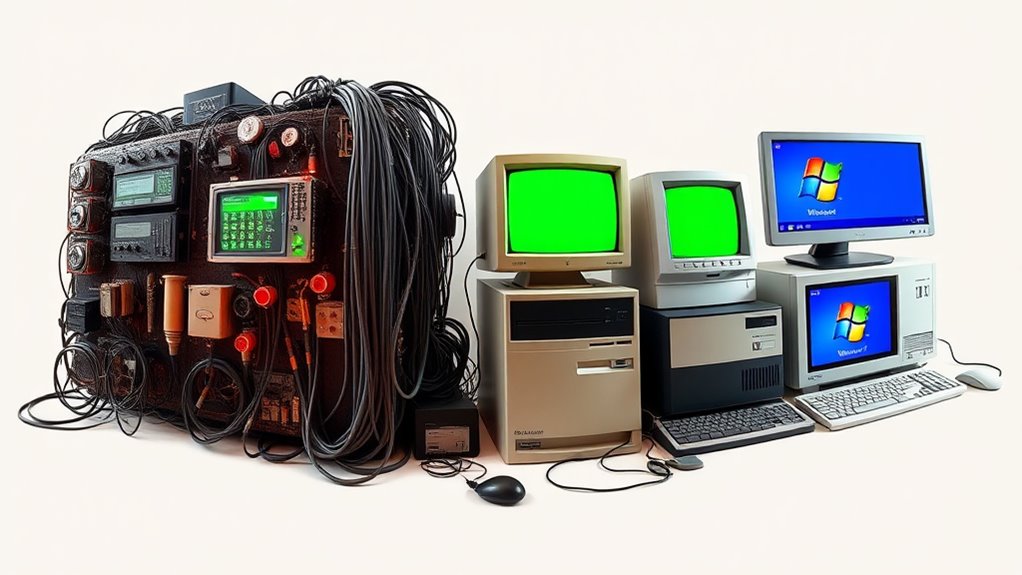
Have you ever wondered how personal computers evolved from simple tools into the powerful devices we rely on today? It all started with basic hardware that gradually improved over decades. Early computers like ENIAC were massive and limited in function, but as technology advanced, so did the hardware. Transistors replaced vacuum tubes, making computers smaller, faster, and more reliable. This shift allowed for more complex calculations and broader applications. As hardware components grew more sophisticated, manufacturers focused on improving user interface design, making computers more accessible and easier to operate. The introduction of keyboards, mice, and graphical displays transformed the user experience, shifting from cryptic command lines to intuitive visual interfaces. These advancements meant you no longer needed specialized training to use a computer; instead, they became practical tools for everyday tasks.
Throughout the 1970s and 1980s, hardware advancements continued at a rapid pace. Microprocessors emerged, integrating thousands of circuits onto a single chip, which considerably boosted processing power and reduced costs. This innovation paved the way for personal computers to enter homes and offices. Simultaneously, user interface design evolved from text-based interfaces like DOS to graphical user interfaces (GUIs). GUIs, with icons, menus, and windows, made computing more visual and user-friendly. You could now interact with the computer using a mouse, clicking on familiar symbols rather than typing complex commands. This shift dramatically improved productivity and lowered the learning curve for new users. Additionally, the development of high refresh rates in projectors enhanced gaming and viewing experiences, highlighting how hardware improvements continue to shape user interaction.
As hardware became more powerful, software also improved to harness this potential. Operating systems like Windows 95 introduced a more cohesive and user-centered interface, emphasizing ease of use and multitasking. Windows 95 combined a friendly graphical interface with better hardware support, making PCs more versatile and appealing to a broader audience. It was a turning point that solidified personal computers as essential tools for work, entertainment, and communication. You probably remember how Windows 95’s start menu, taskbar, and plug-and-play features changed your interaction with your computer, making complex tasks straightforward and accessible.
In essence, the evolution of personal computers is a story of continuous hardware advancements paired with smarter, more intuitive user interface design. These innovations transformed computers from bulky, specialized machines into sleek, user-friendly devices that fit seamlessly into daily life. Today, thanks to these developments, you can perform complex tasks with a few clicks, whether editing videos, browsing the internet, or managing your finances. The journey from ENIAC to Windows 95 laid the foundation for the powerful, versatile computers you use now, constantly pushing the boundaries of what’s possible.
Frequently Asked Questions
Which Company Developed the First Commercially Successful Personal Computer?
You should know that IBM developed the first commercially successful personal computer, known as the IBM PC, which revolutionized the industry. Apple Inc. also played a pivotal role with its innovative Apple II, but it was IBM’s entry that truly made PCs mainstream. When you use a modern computer, you’re building on the foundation laid by IBM’s pioneering efforts, and later, companies like Apple contributed to the evolution of personal computing.
How Did the Transition From Command-Line to Graphical Interfaces Impact Usability?
Imagine switching from a cryptic maze of text commands to a vibrant, intuitive visual interface. You find that steering your computer becomes faster and more natural, greatly enhancing your user experience. The shift from command-line to graphical interfaces transforms complex commands into accessible icons and windows, making technology less intimidating. This shift democratized computing, allowing more people to interact confidently with their machines and opening up new possibilities for creativity and productivity.
What Were the Major Technical Challenges in Developing ENIAC?
You face major challenges developing ENIAC due to hardware limitations and programming complexity. The hardware lacked sufficient speed, storage, and reliability, making it difficult to build a functional machine. Programming was complex because it involved manually wiring circuits and using plugboards, which was time-consuming and error-prone. These obstacles slowed progress but laid the groundwork for future advancements in computer technology.
How Did Software Development Evolve Alongside Hardware Improvements?
Imagine you’re coding on a modern laptop, but back in the early days, software development kept pace with hardware advances by shifting from machine language to high-level programming languages like FORTRAN and COBOL. Software paradigms evolved from simple routines to structured programming, enabling more complex applications. As hardware improved, programmers could develop more sophisticated software, leading to user-friendly interfaces like Windows 95, which revolutionized personal computing for everyday users.
What Role Did User Communities Play in Early PC Adoption?
You see, user communities played a pivotal role in early PC adoption by sharing tips, software, and troubleshooting advice. They created a sense of belonging and enthusiasm that encouraged more people to try computers. These communities often organized meetups and exchanged knowledge, helping new users overcome fears and uncertainties. Their collective efforts accelerated adoption, made technology more accessible, and fostered innovation through collaboration and shared experiences.
Conclusion
So here you are, marveling at how far we’ve come from ENIAC’s giant coils to Windows 95’s sleek interface. It’s ironic, really—you started out marveling at massive, clunky machines, and now, you carry more computing power in your pocket than those early giants ever dreamed of. Who would’ve thought that someday, your tiny device would be capable of running entire worlds? It’s a wild ride, and it’s only just beginning.