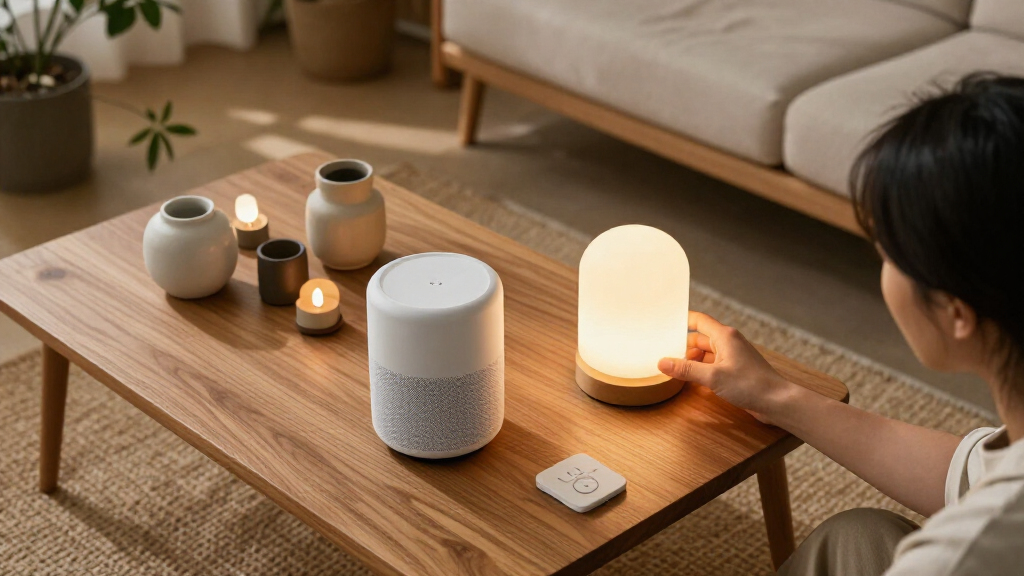

Choosing between smart home devices and accessories is really a question of whether you need a connected home’s main functions or want to improve a setup that already works. Smart speakers, hubs, cameras, thermostats and smart lights can create core capabilities; sensors, buttons, plugs and replacement remotes often make those capabilities easier to use or extend them to more rooms.

Get furniture and decor delivered free with Prime
- Fast, free delivery on millions of items
- Prime Video, Amazon Music and more included
- Member-only deals all year
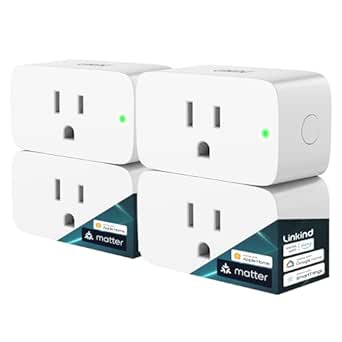
Linkind Matter Smart Plug, 4-Pack
- ✔ Pack size: 4 plugs
- ✔ Smart home compatibility: Apple Home, Alexa, Google Home, SmartThings, AiDot
- ✔ Maximum load: 15 A; 1800 W

EIGHTREE Wi-Fi Smart Plug, 15 A, 4-Pack
- ✔ Quantity: 4 plugs
- ✔ Maximum amperage: 15 A in title; 10 A in specifications
- ✔ Connectivity: 2.4 GHz Wi-Fi

Amazon Echo Show 5 Smart Display with Alexa, Cloud Blue
- ✔ Display: 5.5-inch touchscreen
- ✔ Camera: 2 MP with built-in shutter
- ✔ Speaker: 1.75-inch full-range speaker
The difference affects what your money buys: core devices can work independently and establish a platform, while accessories tend to be cheaper but may depend on a compatible hub, app or device. Choose devices if you are starting from scratch or need a new function. Choose accessories if your existing system has a clear gap and you have checked compatibility.
At a Glance
| Criteria | Smart home devices | Smart home accessories | Winner |
|---|---|---|---|
| Primary role | Provide core functions such as voice control, lighting, security or climate control | Add control, coverage or convenience to existing devices | Depends |
| Standalone usefulness | Often useful on their own, though some need a hub or internet connection | Often limited without a compatible core device or platform | A |
| Typical upfront cost | Usually higher because each product delivers a complete function | Usually lower per item, though multiple add-ons can add up | B |
| Compatibility needs | Can establish a platform, but may still rely on a specific ecosystem or protocol | Often depends on a particular hub, device, radio standard or app | A |
| Installation and setup | Ranges from plug-in setup to more involved installation | Often simple to install, but pairing and automation setup may take time | B |
| Potential impact | Can change how a room or system works | Usually incremental, with bigger gains when it solves a recurring problem | A |
| Best starting point | Better for creating a smart home or adding a missing core function | Better for improving a compatible system already in place | Depends |
Linkind Matter Smart Plug, 4-Pack
The Linkind four-pack is our most versatile accessory choice because Matter support gives it a wider path into an existing smart home than a plug tied to one app ecosystem. It can work with Apple Home, Alexa, Google Home, SmartThings, or AiDot, letting us choose a compatible control setup rather than committing only to one voice assistant. Compared with EIGHTREE, that flexibility is the main reason Linkind ranks first.Its most useful distinction is local-network communication during internet outages. That can keep compatible Matter devices reachable inside the home when the outside connection drops, though it does not mean every remote feature will continue to work. The plugs also support schedules, timers, remote access, and voice control, so we can automate lamps or other suitable appliances without adding a display like the Echo Show 5.There is a setup tradeoff: Apple Home, Alexa, Google Home, and SmartThings require a Matter controller, while the AiDot app can be used without a hub. The plugs also need 2.4 GHz Wi-Fi and IPv6, so network compatibility deserves a check before we buy. The 15 A and 1800 W ratings are clearly specified here, unlike EIGHTREE’s conflicting amperage information, but this remains a plug for devices within its stated electrical limits.
Pros:
- Supports Apple Home, Alexa, Google Home, SmartThings, and AiDot.
- Local-network communication can keep Matter device control available during internet outages.
- Includes remote control, scheduling, timers, and voice control.
- Rated for up to 15 A and 1800 W, with fire-resistant materials and protection features.
Cons:
- Most listed smart home platforms require a Matter controller.
- Requires 2.4 GHz Wi-Fi and IPv6, which may need network compatibility checks.
Best for: Households that use or plan to use Matter and want a four-plug set with broad platform options and local control during internet interruptions.
Not ideal for: Buyers who want setup without a Matter controller on their preferred platform, or whose Wi-Fi network does not support the required 2.4 GHz and IPv6 settings.
Bottom line: We recommend Linkind first for buyers who value ecosystem choice and Matter-based local control and can meet its controller and network requirements.
“We recommend Linkind first for buyers who value ecosystem choice and Matter-based local control and can meet its controller and network requirements.”
EIGHTREE Wi-Fi Smart Plug, 15 A, 4-Pack
EIGHTREE is the simpler route for households that want to add several remotely controlled outlets without buying a hub. Setup runs through the Smart Life app, and from there the plugs support Alexa, Google Assistant, and SmartThings, along with schedules, timers, countdowns, and cycle settings. That makes this set easier to approach than Linkind for buyers who do not need Matter or its local-network outage behavior.The tradeoff is a narrower compatibility story. EIGHTREE supports the named assistants and SmartThings, while Linkind adds Apple Home and broader Matter-based options. Both rely on 2.4 GHz Wi-Fi, but EIGHTREE does not list Linkind’s IPv6 requirement or local-network Matter behavior. Its Bluetooth-assisted setup may help during pairing, though voice control still depends on completing setup in Smart Life.We should pay particular attention to the electrical rating before choosing this set. The product title says 15 A, while the specifications say 10 A; that discrepancy makes the supported load unclear. It is a practical option for ordinary compatible household devices once that limit is confirmed, but buyers should not assume the higher figure applies. The compact round shape may also suit tight spaces better than a bulky plug, though the listed dimensions are larger than the phrase “compact” alone might suggest.
Pros:
- Works with Alexa, Google Assistant, and SmartThings.
- No hub is required for Wi-Fi setup and control.
- Supports schedules, timers, countdowns, and cycle settings.
- Bluetooth-assisted setup and a round design can help with pairing and tight placements.
Cons:
- The listing conflicts between a 15 A title and 10 A specifications.
- Voice control requires setup through the Smart Life app.
- Limited to 2.4 GHz Wi-Fi and lacks the Matter outage behavior described for Linkind.
Best for: Alexa, Google Assistant, or SmartThings households that want multiple app-controlled plugs without adding a hub.
Not ideal for: Buyers who need Apple Home or Matter flexibility, or who need an unambiguous amperage rating before selecting a plug for a particular appliance.
Bottom line: EIGHTREE is a sensible hub-free pick for supported ecosystems, as long as we confirm its actual load rating before use.
“EIGHTREE is a sensible hub-free pick for supported ecosystems, as long as we confirm its actual load rating before use.”
Amazon Echo Show 5 Smart Display with Alexa, Cloud Blue
The Echo Show 5 is the lineup’s only screen-based device, so it serves a different purpose from the Linkind and EIGHTREE plug sets. Its 5.5-inch touchscreen puts compatible smart home controls, updates, media, and video calls in one visible place. For a kitchen counter or bedside table, that can make checking a camera or controlling an Alexa-compatible device more immediate than reaching for a phone. It is our pick when the household needs an interface, not just another connected outlet.Compared with Linkind, the Echo Show 5 is more centered on Alexa and offers a screen, camera, and speaker rather than Matter flexibility across several ecosystems. Compared with EIGHTREE, it can be the voice-control center for compatible devices, but it does not provide four independently controlled plugs. Buyers who want to automate several lamps or appliances should consider either plug pack alongside a display rather than expecting this device to replace them.The camera has a built-in shutter, and a separate control turns the camera and microphones off, giving us physical privacy controls. The 2 MP camera and 1.75-inch speaker support calls and casual media, but this compact display is not a dedicated entertainment screen. Some skills and services may require subscriptions or additional fees, and it does not support ad-hoc or peer-to-peer Wi-Fi networks. Its recycled fabric and aluminum, plus recyclable packaging, are useful material choices, though they do not change its Alexa-centered fit.
Pros:
- Combines a 5.5-inch touchscreen with Alexa smart home control.
- Camera supports video calls and compatible home check-ins.
- Physical camera shutter and microphone and camera off button offer privacy controls.
- Uses recycled materials and recyclable packaging.
Cons:
- More Alexa-centered than the Matter plug, with a different role from either plug set.
- Some skills and services may require subscriptions or additional fees.
- Does not support ad-hoc or peer-to-peer Wi-Fi networks.
Best for: Alexa households that want a compact shared screen for compatible smart home controls, video calls, media, and at-a-glance information.
Not ideal for: Buyers seeking a platform-neutral controller, multiple smart outlets in one purchase, or a larger screen and fuller media experience.
Bottom line: We would choose the Echo Show 5 when a visible Alexa control point and calling features matter more than adding several smart outlets.
“We would choose the Echo Show 5 when a visible Alexa control point and calling features matter more than adding several smart outlets.”
As an Amazon Associate we earn from qualifying purchases.
Key Differences
The defining distinction is what each purchase contributes. A smart thermostat can directly control heating, and a camera can provide video monitoring; those are core functions. A door sensor might trigger an alert or automation, but it usually needs a hub or another compatible device to make that useful. Accessories can make a system feel more complete, but their value depends on the system they support.
Cost and compatibility complicate the choice. An accessory may be inexpensive by itself, yet several add-ons can cost as much as a core device. Devices can cost more upfront but bring their own useful function and sometimes provide the hub or ecosystem that accessories need. Before buying either category, check whether the product works with your existing platform, supports the features you want, and depends on a hub that you do not own.
For most first-time buyers, a core device is the better first purchase because it establishes a useful capability. For households with a working setup, an accessory can be better value when it fixes a specific inconvenience, such as reaching a light switch across the room or adding a sensor to a door. The right choice turns on the gap you are trying to fill.
Detailed Comparison
Primary role (major difference)
Smart home devices supply the main function, such as lighting, climate control, monitoring or voice control. Accessories add a way to trigger, extend or refine a function already available. The winner depends on the goal: a new capability calls for a device, while a usability improvement favors an accessory. This is a major distinction because it determines whether the purchase can solve the problem by itself.
Standalone usefulness (Smart home devices wins — moderate)
Many devices deliver value as individual products, even if setup requires an app or network. Accessories are more likely to need a compatible hub or device; a sensor without a system to receive its signal may do little. Devices win by a moderate margin for shoppers who have not built a system. Existing platform owners may find accessories perfectly useful within that setup.
Upfront cost and value (Smart home accessories wins — moderate)
Accessories usually cost less per item, which makes them attractive for a targeted improvement. Devices cost more, but their price often buys a complete function. The accessory’s lower price is a real saving only when the required hub or compatible device is already owned. This is a moderate, conditional advantage for accessories; paying more for a core device makes sense when it replaces a missing capability.
Compatibility (Smart home devices wins — moderate)
A core device can help define which app, ecosystem or connectivity standard a household uses. Accessories commonly need to match that system, and names such as Matter or Thread alone do not guarantee every feature works the same way across platforms. Devices have a moderate edge as a foundation, but buyers should check specific compatibility claims for both categories before purchase. A mismatched accessory can be cheap and still unusable.
Setup and installation (Smart home accessories wins — minor)
Small accessories such as buttons and plug-in sensors are often easier to place than a thermostat or wired security device. They can still require pairing, app permissions and automation rules. Accessories win by a minor margin for simple installations. A device can be just as easy if it plugs in, so the actual product matters more than the category label.
Impact on daily use (Smart home devices wins — moderate)
Devices can change a routine by automating lights, adjusting temperature or providing security monitoring. Accessories typically improve how often or how conveniently that system is used. Devices win by a moderate margin when a household lacks the core function; an accessory can win for a specific friction point, such as adding physical control for someone who does not want to use voice commands.
Best purchase sequence (major difference)
A core device is usually the stronger starting point because it gives a new system something useful to do and may provide its control hub. For an established setup, adding an accessory to solve a known problem can be the more disciplined purchase. Neither category wins universally: buy the first product that addresses a real need and works with the platform you intend to keep.
Smart home devices: Pros and Cons
Pros:
- Provides a clear primary function
- Often useful without buying several other products
- Can establish a platform for later expansion
- Can make a larger difference to daily routines
Cons:
- Usually costs more upfront
- Some products require installation or setup work
- A platform choice can shape later compatibility
- May include features a household does not need
Smart home accessories: Pros and Cons
Pros:
- Usually cheaper for a focused improvement
- Often easy to place or install
- Can extend an existing system room by room
- Adds physical controls or automation triggers
Cons:
- May not work without a compatible hub or device
- Value can be hard to judge outside the existing setup
- Several add-ons can cost as much as a core product
- Compatibility and feature support require checking
Who Should Choose What
Choose Smart home devices if:
- You are starting a smart home and need a useful core function
- You need lighting, climate control, voice control or monitoring that you do not currently have
- You want a product that can anchor a compatible system
Choose Smart home accessories if:
- You already own compatible smart home devices or a hub
- A specific inconvenience could be fixed with a button, sensor, plug or control accessory
- You want a lower-cost way to extend a system gradually
Skip both if: Skip both if you cannot identify a recurring need, or if the products you are considering require an ecosystem you do not want to maintain.
Value for Money
Accessories are better value when the compatible system is already paid for and the add-on solves a concrete problem. A low-cost sensor that reliably triggers an existing light may earn its price quickly through convenience. If it also requires a new hub, however, compare the combined cost with a core device that could provide a broader function.
Pay more for a smart home device when you need what it does, not simply because it has more features. For someone building a setup, one well-chosen device is often better value than a collection of dependent accessories. For an established home, targeted add-ons can stretch an existing investment. Compare the total purchase cost, including any hub, subscription or installation charge, and make sure the promised automation works with your chosen platform.
Final Verdict
For a first purchase, choose a smart home device that solves a clear need and gives the household a reliable foundation. It usually offers more standalone value and has a larger effect on daily use. Choose an accessory when you already have compatible equipment and know exactly what it will improve. The biggest deciding factor is whether you need a new capability or a better way to use one you already own. Do not pay extra for a device with features you will not use, and do not buy a cheap accessory until you have verified its dependencies.
Frequently Asked Questions
Are smart home accessories useful without a hub?
Some are, but many sensors, buttons and controllers need a hub or compatible device to receive signals and run automations. Check the product’s requirements and the specific features supported by your platform before buying.
Should I buy a smart speaker or accessories first?
Buy the product that fills your actual gap. A smart speaker can provide voice control and may coordinate compatible devices, but it is not necessary for every setup. If you already have a controller and need a door sensor or button, the accessory may be the more useful first purchase.
Do accessories save money compared with smart home devices?
Often per item, but not always overall. Accessories are cheaper when the required hub and compatible devices are already in place. Add those dependencies to the total before comparing prices.
How can I check whether a device or accessory will work with my setup?
Check the manufacturer’s compatibility list for your specific hub, app and platform. Confirm that the feature you want is supported, since basic connectivity does not always mean every automation or control option will work.